Start by confirming your company name for onboarding.
This will be used as your display name.
Enter your UniFi API key. We validate it and list your consoles.
We validate the key before saving it.
Discover all consoles and sites for your API key, and register MAC addresses for Wi‑Fi APs and gateways (UniFi may send either in the guest portal).
Add the required settings in UniFi to finish your captive portal integration.
Open UniFi hotspot / guest portal settings for your site (UniFi Site Manager):
Open UniFi (cloud)Values to enter (click to copy)
Choose One way methods → External portal server, press Edit, and add the IPv4 address below. Then scroll down to Landing page settings and add the settings as shown in the screenshot.
IPv4:
46.224.218.90 Domain:
Tenant ID not available
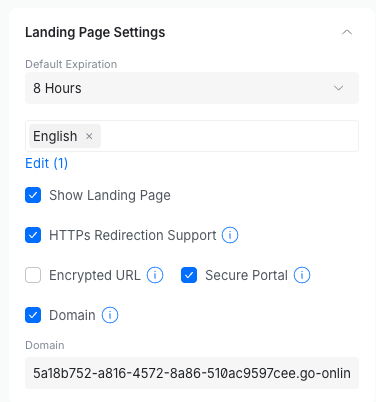
Even if "Encrypted URL" is not selected, this is not a security issue and makes it easier for the captive portal to work.
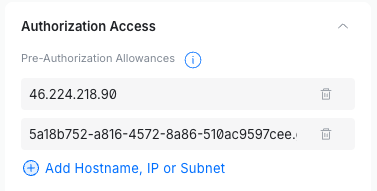
Preauthorization access
Under Preauthorization access, add the same IPv4 address and domain again.
IPv4: 46.224.218.90 — Domain: — (use the copy buttons above)